Speculo blog
Why the MCSS Spreadsheet is a Trap
13 May 2026 · 8 min read
TL;DR.Every NZ public sector agency probably starts its Minimum Cyber Security Standards self-assessment in Excel, and why wouldn’t you? It’s the easy way to do it: low touch, low effort, and you see what you get quite quickly. It works fine for the first return.
The problems come later. Naturally, the standards begin to drift. There’s no way to keep the evidence tied to your scores without increasing the complexity of the workbook by layering in reference points. And the Excel itself has no real function beyond compliance. The score doesn’t translate into anything an exec can act on or fund.
A different MCSS approach can solve all three. This article talks frankly and candidly about why Excel isn’t the right way to go, and is honest about when it still is.
What MCSS demands of an agency, at a glance:
10 standardsscored on the CS-CMM 1–4 maturity scale.
Evidence that justifies each score and holds up when Internal Audit comes looking.
A formal submission to NCSC that accurately reflects where you are, not where you hope to be.
A roadmap that is translatable, relevant, traceable, and measurable.
Your Excel spreadsheet only covers one of these four.
If you’re a security lead at an NZ public sector agency staring down an MCSS self-assessment, the spreadsheet is the obvious move. It’s free, it’s familiar, and somebody on your team has probably already started one, pulled from an NCSC reference or stitched together from the 10 standards and a CS-CMM 1–4 rubric. You own the file, you know what it’s doing, and you can have it in your CIO’s inbox by tomorrow.
We understand why Excel wins the first week. We also know, from working alongside agencies who have walked this road, that it loses the second quarter. This page lays out honestly the three places the spreadsheet falls over, what a proper approach looks like instead, and when Excel is still the right call.
What goes wrong with an MCSS Excel template?
Three things, reliably, inside a 90-day window.
1. Your Excel will go stale within a quarter
An MCSS spreadsheet is a snapshot; the environment it describes is not.
Standards drift because of how they’re interpreted by the people actually conducting the assessments. Maturity levels get read differently from one year to the next, shaped by who’s in the room, what they’ve seen recently, and the tribal understanding of what each standard actually requires.
Meanwhile, your agency isn’t standing still. A new CISO, new processes, a regulatory shift, an incident: any of these can change the evidence behind one or several standards. New threats may alter the perceived maturity of a particular control. New technologies or capabilities can shift things too.
Slowly, things start to drift away from the original interpretation.
The spreadsheet doesn’t warn you when it’s out of date. Nobody opens Excel and sees a “Your framework version is three releases behind” banner. The staleness is invisible until someone asks a question related to it, and you find out the picture you’re working from is no longer usable.
2. Your Excel can’t hold the evidence behind your score
MCSS isn’t marked on your score. It’s marked on your ability to stand behind it.
Ask any GRC analyst who’s been through an audit: the painful part isn’t assigning a CS-CMM level. The painful part is producing the evidence, six months later, that justifies the level you picked. The policy PDF, the screenshot of the Entra ID conditional access config, the change ticket, the penetration test letter, the board minute showing the risk was accepted.
Your Excel can’t hold any of that. You can type “see SharePoint” into a cell, you can hyperlink to a file that has since moved, or you can attach a zip to an email that nobody can find in Outlook twelve months on. What you can’t do is tie a specific piece of evidence to a specific control, keep track of it over time, and produce something that actually cites it when the auditor asks.
There’s no audit trail. The knowledge of what evidence existed, and where it lived, walks out the door with whoever last edited the workbook.
3. Excel gives you a score and very little more
An Excel template gives you a score and very little more. You fill it in, it gives you the answer. So what? Now what?
That “now what” is the real problem. A score on its own doesn’t tell you which standard to fix first, it doesn’t tell you how you compare to agencies of similar size and exposure, and it doesn’t give your CFO a reason to fund the security programme you’re trying to get off the ground. The template ends when the last cell is filled, but the conversation it should start, the one with your exec about funding, is exactly where it can’t help.
What MCSS done properly looks like
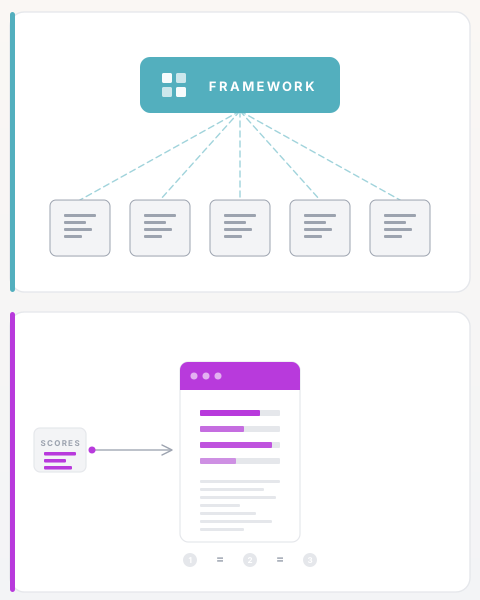
A well-run compliance spreadsheet can still do a useful job of pointing at the problems within an organisation. But good security management has always asked for more than that. It’s the ability to convey risk in the right context for the organisation, in language that works for people at every level, and in a way that can be revisited, updated, and relied on as things change. That’s where a spreadsheet runs out.
A framework library that lives outside your workbook. The standards and the evidence behind them need to live in one central repository that the whole team works from, rather than scattered across workbooks, SharePoint folders, and email threads where things slowly die (or get archived if they’re lucky). When guidance changes, or your own understanding of a standard shifts, you can see exactly which assessments it touches and work from there. You don’t re-read everything from scratch. And the evidence you’ve already gathered stays tied to the control it supports, so when something changes you’re building on what you have, not starting over. That’s a reusable foundation. Excel is a document you remake every cycle.
Evidence tied directly to controls. Every maturity score needs the actual evidence sitting behind it, not a reference to a file that may or may not still be where you left it. The policy document, the config screenshot, the change ticket, the pen test sign-off: each one attached directly to the control it supports, with a record of who ran the assessment and when.
That’s what makes a score hold up when your internal auditor comes looking, or when a new CISO walks in and asks why you’re sitting at CS-CMM 3 on identity. The answer isn’t in someone’s head. It’s in the record.
Reporting someone can act on. The output has to be something an exec can read, an Audit and Risk Committee can stand behind, and a CFO can fund against. That means explaining what a CS-CMM 2 on identity actually means for the organisation, not just noting the score is low. It means ranking which gaps to close first, based on the most risk reduction for the least effort. And it means producing a report that doesn’t shift each time you run it: the same scores in, the same report out, every time.
A document that changes when you re-run it isn’t a basis for funding decisions.
These three things are the difference between an MCSS submission that gets filed and one that gets funded: a live framework library, evidence tied to controls, and reporting someone can act on. They’re also the three things Excel can’t do.
Excel vs a proper MCSS approach
| Criterion | Excel MCSS template | A proper MCSS approach |
|---|---|---|
| Standards updates | Manual: someone notices and re-keys | Changes surface automatically against your existing answers |
| Evidence capture | Cell comments, hyperlinks, “see SharePoint” | Evidence attached directly to the control, versioned, with a clear record of the assessment |
| Risk quantification | Not available | Your scores mapped to the risks the organisation actually faces |
| Prioritisation | Sort by score descending, then guess | Ranked by risk reduction against the difficulty of actually doing it |
| Audit defensibility | As defensible as the person who last edited the workbook | A clear record of every assessment: who ran it, when, and against what evidence |
| Board-ready output | Paste charts into slides, reformat every quarter | The same scores always produce the same report, generated on demand |
| Year-on-year consistency | Drifts with whoever edits the file | The same methodology each cycle, so comparisons across years mean something |
“But we’ve already built an Excel template” and other common objections
Should we throw away the workbook our team has already built?
No. The hours your team spent agreeing CS-CMM levels and mapping the 10 standards are real work, not wasted effort. Any platform worth using will take those scores as a starting point. What you build on top is the evidence layer, the risk view, and the ability to compare your position year on year. The work already in the spreadsheet is the reason switching is straightforward, not a reason to stay.
When is Excel actually fine?
Honest answer: sometimes it is.
If you’re a small Crown entity with no dedicated security lead, no Audit & Risk Committee asking for quarterly reporting, and no active MCSS pressure, Excel will get you through this submission. You don’t need risk-weighted prioritisation and you don’t need a funding business case. You need to complete the self-assessment, file it, and get back to the other ten things on your desk. Closer to a thousand, but who’s counting.
When you hire a security manager, when your leadership asks for a cyber paper, or when NCSC follow-up tightens, that’s when a proper approach starts to earn its place. Until then, a clean Excel template and a quiet afternoon is the right call.
If your agency has a named security lead, a budget bid in the next 12 months, or executive-level cyber reporting obligations, this is written for you.
Does a platform replace the consultant we already use?
No. It makes the consulting engagement cheaper and more focused. A consultant who starts from a solid MCSS report can spend their time on the strategic advice, not on pulling the evidence together. Several agencies run both: the platform handles the data and reporting, the consultant handles what comes next.
How we approach this at Speculo
Speculo is a security risk and compliance platform for any organisation that needs to understand, evidence, and communicate its security posture. That includes New Zealand government agencies and Pacific island governments working through MCSS and NZISM, and the private sector organisations that need to demonstrate the same standard to work alongside them.
We built it because the sector needed a proper way to do this, and nobody else was building one. So we did.
When an agency runs MCSS through Speculo, the standards library lives centrally and flags what’s changed against your existing scores when guidance moves. Evidence sits directly behind the control it supports, so the rating and the thing that justifies it are always in the same place. The output is a single consistent report, built to hold up at Internal Audit and go straight into the appendix of a Cabinet paper or a Leadership Team submission. If your team has already scored the 10 standards in a spreadsheet, those scores are the starting point. The work isn’t wasted.
Access is rolling out in waves. Current customers and anyone in the active workshop programme are going first. Everyone else can join the waiting list. We’re working through it as fast as we can.
Two ways to start
Join the waitlist for free MCSS access →
Book a 1-hour workshop → we walk your team through your MCSS results and leave you with the shape of a funding business case to take upstairs.
Chris Hawksworth is the founder of Speculo, a strategic cyber risk and compliance platform built in Wellington, New Zealand.